
நாட்கள் சென்று
யாருக்காகவோ
எழுத வந்தேன்
யாருக்காகவோ
எழுதுவதை
நிறுத்தினேன்..
எனக்காக
எப்போதாவது
எழுதிய
பொழுதுகள்
விடியல்
இல்லாத
இரவுகளாயின...
இருப்பினும்
விடியலில்
வரும்
அன்பான
மின் அஞ்சல்கள்
"உனக்காக நீ எழுதாதே"
இதை
இன்னார்
என்று
சொல்ல
எனக்கு
யாரும்
இருந்ததில்லை
சொல்லுபவர்
அத்தனை
பேரும்
இன்சொலார் !!
எழுதியது
அழிந்துபோகும்
மறைந்து போகும்
மறந்தும் போவேன்..
மீண்டும்
ஆரம்பிப்பேன்..
மீண்டும்
முடிப்பேன்...
யாருக்காகவோ....
.

சொல்ல தயங்கினார். ஐந்து இதழ்களும் விற்காமல் வீணாகி போனதே என்ற ஆதங்கம் எனக்கு. மீண்டும் கேட்டதற்கு... "பிரச்சனையாகிவிட்டது" என்றார்.
"என்ன பிரச்சனை?"
கடந்த மாதம் கிழக்கு பதிப்பகத்திலிருந்து வந்து... விற்பனைக்கு கொஞ்சம் புத்தகம் தந்தார்கள். புத்தகங்களை பார்வைக்கு வைக்க அவர்களே ஒரு சின்ன ஷோ-கேஸ் மாதிரி தந்தார்கள். அதில் புத்தகங்களை அடுக்கி வெளியில் பார்வைக்கு வைத்திருந்தேன். ஈழம் பேசப்படுவதால்.. நன்றாக விற்குமே என்ற எண்ணத்தில்.. பிரபாகரன் குறித்த இரண்டு புத்தகங்களை புத்தக வரிசையில் முதலில் வைத்திருந்தேன்.
இப்படி வைத்த இரண்டாவது நாள் மப்டியில் இருந்த போலீசு வந்து... "உங்க மேலே கம்பைளைண்ட் வந்திருக்கு! விசாரிக்கனும். கூட வர்றீங்களா!" என அழைத்தார். அப்பாவை கடையில் நிற்க வைத்து போனேன். காலையிலிருந்து மாலை வரை விசாரித்தார்கள். அடுத்தடுத்த இரண்டு நாள்களும் இதே மாதிரி தொடர்ச்சியாக விசாரணை. விசாரணைக்கு வர வில்லையென்றால்... என்ற மிரட்டல் வேறு.
நான் யார்? எங்கே பிறந்தேன்? என் குடும்ப பின்னணி என்ன? என் சொந்தகாரன் எங்கெல்லாம் இருக்கிறார்கள்? .. என்கிற ரீதியில்.. என் மொத்த ஜாதகத்தையும் கிளறிவிட்டார்கள்.
"நீங்க சொல்ல வேண்டியது தானே! கிழக்குப் பதிப்பகத்தின் புத்தகங்களைத் தானே விற்கிறேன்" என குறுக்கிடேன்.
அதை சொன்னதற்கு... புத்தகத்தை வெளியிட்டது அவங்க! உன்னை விற்க சொன்னது யார்? என்றார்கள்.
மூன்றாவது நாள்... 'இனி இப்படி புத்தகங்களை விற்காதே!" என மிரட்டி அனுப்பினார்கள். முதல் நாள் அப்பா பார்த்துகொண்டார். இரண்டு நாள் கடையை மூடிவிட்டு போனேன். இரண்டு நாள் பொழப்பு கெட்டுப்போச்சு!
நல்ல வேளைக்கு கடைக்குள்ளே கிழக்கு பதிப்பகத்தோட 'அல்கொய்தா'ப் பற்றிய புத்தகம் வைத்திருந்தேன். அது அவங்க கண்ணுல படல! பட்டிருந்துச்சு... நான் ஒரு முஸ்லீமாகவும் இருக்கிறதனால... என்னை காலி பண்ணியிருப்பார்கள்."
இதை விவரிக்கும் பொழுது... வருத்தம், கோபம், விரக்தி என அவர் முகத்திலும், பேச்சிலும் வெளிப்பட்டது.
***
ஈழத்திற்கு உருகு உருகு உருகிற கருணாநிதியின் ஆட்சியின் கீழ் தான், கிழக்குப் பதிப்பகம் புத்தகங்களை விற்றதற்கே... மூன்று நாள் ஒரு பொட்டிக்கடைகாரரை விசாரணை என்ற பெயரில் டார்ச்சர் செய்து இருக்கிறர்கள்.
இங்கு விடுதலைக்கான இயக்கங்கள் வளர வேண்டும். அப்பொழுது தான் இந்த அரசு, அரசியல் போலீசார் (க்ரைம் போலீசு = ரகசிய போலீசு) எல்லாம் வாலைச்சுருட்டி அடங்கியிருப்பார்கள்.
அப்படி வளராத வரை... இப்படி பிள்ளை பூச்சிகளை பிடித்து... "சரோஜா படத்தில் கேனை மண்டையில் தட்டி விசாரிப்பார்களே!" அது மாதிரி, வதைத்து கொண்டுதான் இருப்பார்கள்.


3Delight is a fast, high quality, RenderMan®-compliant renderer designed to produce photo-realistic images in demanding production environments. The renderer was introduced to the public in the year 2000 after being used for more than a year as the sole renderer in a sister production company. It is now widely used and earning a reputation as a benchmark in rendering technology.

Some of its features include ray tracing, global illumination (including photon mapping, final gathering and high dynamic range lighting and rendering), realistic motion blur, depth of field, complete geometry support (including efficient rendering of hair and fur), programmable shaders, quality antialiasing and antialiased shadow maps. Advanced features include Ri filtering, network caching and highly customizable workflow. It is available for Windows, Linux and Mac OS X.

DNA Research announces the release of 3Delight for Softimage 2.0, the second major evolution of the fully integrated version of its RenderMan-compliant renderer for Autodesk® Softimage (formerly SOFTIMAGE|XSI) 3D animation software for visual effects and games production. Building on top of an already solid baseline, this new version further improves integration with Softimage software and introduces support for the new Interactive Creative Environment (ICE) technology, allowing the rendering of massive amounts of particles with 3D motion-blur and depth of field.
Download - Product Selection
Please select the product you would like to download :
> 3Delight
Our stand-alone RenderMan-compliant renderer.
> 3Delight for Maya
Our plug-in for Autodesk Maya software (currently provided as part of the 3Delight package).
> 3Delight for Softimage
Our plug-in for Autodesk Softimage 3D Animation software.
Full Information : http://www.3delight.com/en/index.php/home


Paint.NET is free image and photo editing software for computers that run Windows. It features an intuitive and innovative user interface with support for layers, unlimited undo, special effects, and a wide variety of useful and powerful tools. An active and growing online community provides friendly help, tutorials, and plugins.
Features
Simple, intuitive, and innovative user interfaceEvery feature and user interface element was designed to be immediately intuitive and quickly learnable without assistance. In order to handle multiple
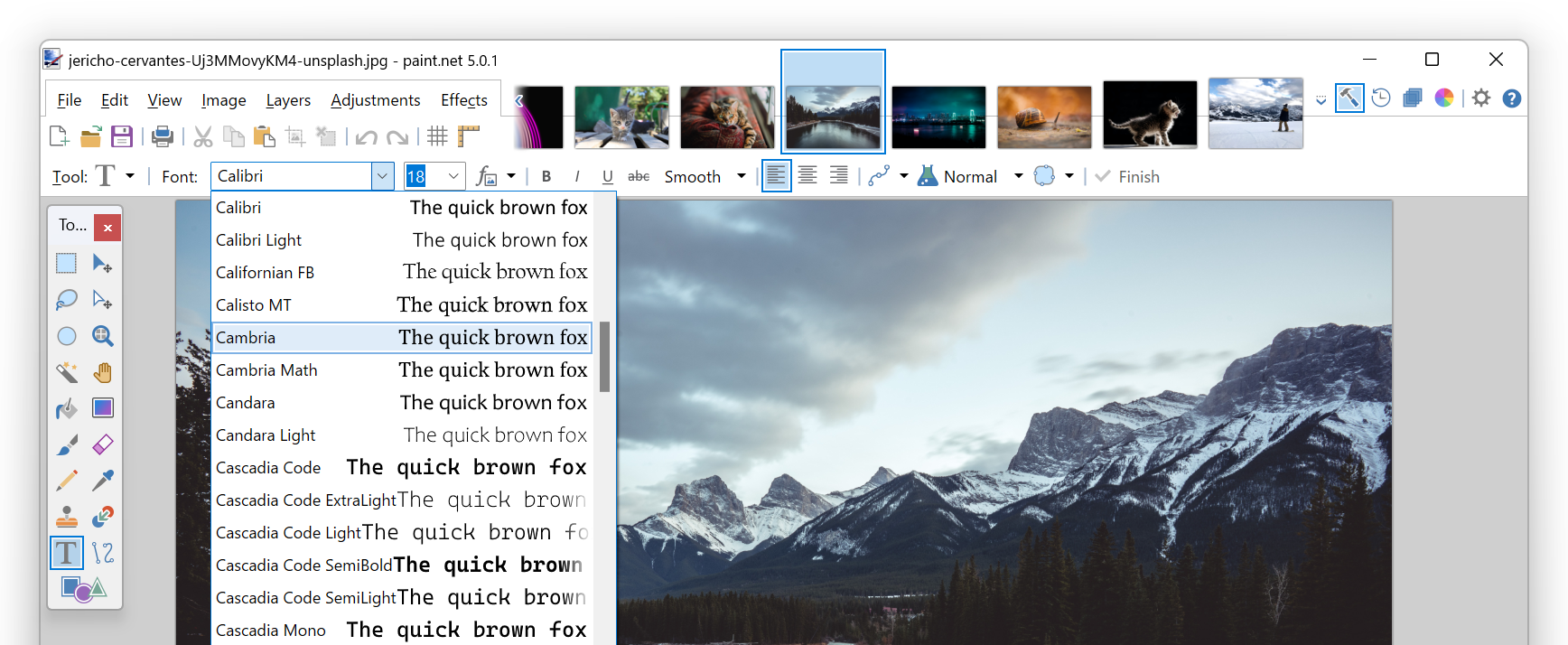 images easily, Paint.NET uses a tabbed document interface. The tabs display a live thumbnail of the image instead of a text description. This makes navigation very simple and fast.
Layers
Usually only found on expensive or complicated professional software, layers form the basis for a rich image composition experience. You may think of them as a stack of transparency slides that, when viewed together at the same time, form one image.
Download page : http://www.getpaint.net/download.html

Paint.NET is free image and photo editing software for computers that run Windows. It features an intuitive and innovative user interface with support for layers, unlimited undo, special effects, and a wide variety of useful and powerful tools. An active and growing online community provides friendly help, tutorials, and plugins.
Features
Simple, intuitive, and innovative user interfaceEvery feature and user interface element was designed to be immediately intuitive and quickly learnable without assistance. In order to handle multiple
images easily, Paint.NET uses a tabbed document interface. The tabs display a live thumbnail of the image instead of a text description. This makes navigation very simple and fast.Layers
Usually only found on expensive or complicated professional software, layers form the basis for a rich image composition experience. You may think of them as a stack of transparency slides that, when viewed together at the same time, form one image.
Download page : http://www.getpaint.net/download.html
வழக்கமாக ஆட்டோ கேடில் நாம் ஒரு வரைபடத்தை உருவாக்கி சேமிக்கும் பொழுது அது DWG கோப்பாக இருக்கும். இந்த கோப்பு ஆட்டோ கேட் மென்பொருள் உள்ள கனினியில் மட்டுமே திறக்கும் படியாக இருக்கும்.
சில சமயங்களில் நமது வாடிக்கையாளருக்கு ஒரு டிராயிங்கை மின் அஞ்சல் செய்யும்படி இருக்கும். அதேவேளை அவரது கணினியில் ஆட்டோ கேட் மென் பொருள் இல்லாமல் இருக்கலாம். அல்லது ஆட்டோ கேட் உபயோகிக்க தெரியாதவராக இருக்கலாம்.
இதற்கு நம்மில் பலர் உபயோகிக்கும் வழி, அந்த கோப்பை JPG or Tiff கோப்பாக மாற்றி அனுப்புவது. ஆனால் இந்த முறையில் மாற்றப்படும் படங்கள் அவ்வளவு தெளிவாக இருப்பதில்லை அத்தோடு Background colour கருப்பு நிறமாக இருப்பதால், படத்தை பார்ப்பவருக்கும் ஒரு வித சலிப்பை தட்டும் விதமாக இருக்கும். பெரிய வரைபடமாக இருந்தால் அதை Zoom in / Zoom out செய்யும் பொழுது படத்தின் தரம் மிகவும் மோசமானதாக இருப்பதுடன். அதில் ஒரு Proffessional Touch இருக்காது. PDF கோப்பாக மாற்றுவதற்கும் நம்முடைய கணினியில் வசதி இருக்க வேண்டும்.
இந்த பிரச்சனையை எளிதாக தீர்க்க..,
விண்டோசில் WMF (Windows Meta File) என்ற வடிவம், அனைத்து கணினியிலும் திறக்கக் கூடியதாகவும் (Windows Picture and Fax viewer), எவ்வளவு பெரிதாக்கினாலும் தரம் குறையாமல் இருக்கும்.
வழக்கமாக ஆட்டோ கேடில் டிராயிங் ஏரியா கருப்பு நிறமாக இருக்கும். இதை வெள்ளை நிறமாக மாற்றுவோம்.
Tools menu விற்கு சென்று Options கிளிக் செய்யவும். இதில் Display tab-ல் Colours பட்டனை கிளிக் செய்து Window Element - இன் கீழ் Model Tab Background என்று இருப்பதில் நிறத்தை Black இற்கு பதிலாக White ஐ தேர்வு செய்து கொள்ளவும். Apply&Close மற்றும் Apply பிறகு Close கொடுத்து விடவும். இப்பொழுது உங்கள் டிராயிங் ஏரியா வெண்மையாக மாறியிருக்கும்.

இப்பொழுது Command Window வில் wmfout என்ற கட்டளையை கொடுத்து என்டர் செய்து, கோப்பின் பெயரை கொடுத்து, பிறகு டிராயிங் ஏரியாவை தேர்வு செய்து என்டர் கொடுத்தால் போதுமானது.
WMF கோப்பு ரெடி! இனி இந்த கோப்பு எல்லா கணினியிலும் ஆட்டோ கேட் துணையின்றி திறக்கும்படியாக இருக்கும்.
மேலே குறிப்பிட்ட வழியை பின்பற்றி டிராயிங் ஏரியாவின் நிறத்தை பழையபடி கருப்பாக மாற்றிவிடவும்.
இந்த ஆட்டோ கேட் பற்றிய பதிவுகள் தொடர்ந்து இடலாம் என கருதுகிறேன். (வரவேற்பு இருந்தால்... உங்களுக்கு உபயோகமாக இருந்தால்)


கருத்துகள் இல்லை:
கருத்துரையிடுக